To-Do List Printable
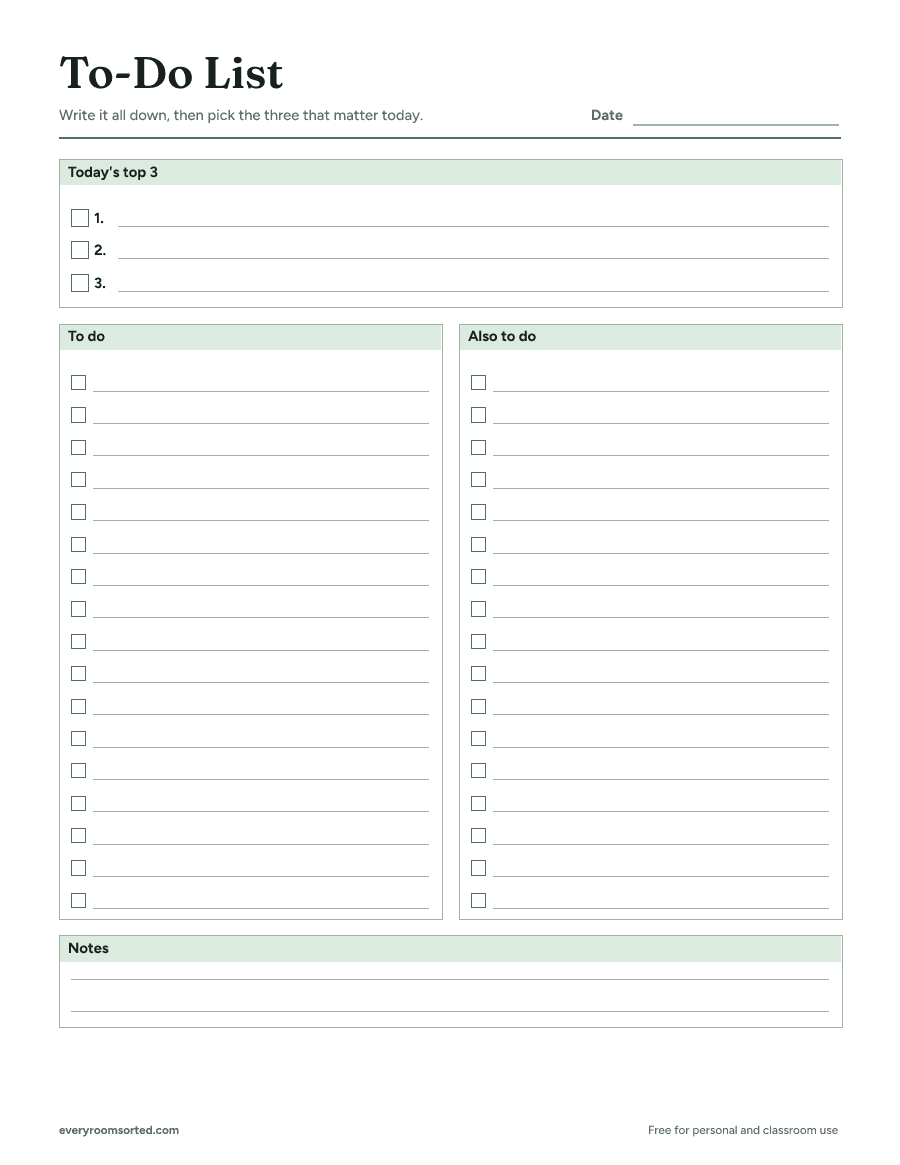
A one-page to-do list with today's top three at the top, plenty of lines to tick off underneath and a little room for notes.
Updated
Download the free PDF
One US Letter page with light lines that are easy on ink. No sign-up, no email.
Download the PDFFree for personal and classroom use. Please share a link to this page rather than the file. Terms of use
Who it’s for
This list is for days with more to do than you can hold in your head. It keeps the most important things at the top, so a long list never buries what matters.
It works for a parent juggling school forms and errands, someone working from home with a long task list, and anyone facing a weekend of chores. Because the page is plain, it fits a work day, a home day or a single project equally well.
What’s on the page
- Today’s top 3: three lines with boxes, for the tasks that make the day a success.
- Two columns of boxes: 34 lines for everything else, headed “To do” and “Also to do.”
- Notes: a few lines for phone numbers, ideas or what to remember tomorrow.
A date line sits at the top right, so a page left on the counter never gets mixed up with yesterday’s.
How to use it
- Write the date at the top.
- Empty your head: write every task in the columns, in any order.
- Choose three and copy them into the top box.
- Work through the top three first, then the rest of the list.
- Move what’s left to tomorrow’s page, or cross it off if it no longer matters.
How to choose the top three
The top box is the heart of the page. A long list feels busy, but finishing the three right things is what makes a day feel done.
Start with what can’t wait
Look for tasks with a deadline today: a form due at school, a bill, a call that has to happen during office hours. Those go in first.
Then pick what moves things forward
If there’s room left, choose the task that would make tomorrow easier or that you’ve been putting off longest. Getting one dreaded job done often lifts the whole day.
Keep it to three
It’s tempting to squeeze in a fourth. Leave it in the columns instead: if the top three get done early, it’s the next one you pick up.
How to use the two columns
The columns hold everything else, so let them be messy. Write tasks as they come to mind, and don’t worry about order.
One easy way to sort them at a glance is by place. Put tasks you do at home in the “To do” column and errands or calls in “Also to do,” so you can see in a second what to bundle into one trip.
Some people prefer to split by person instead, with one column for their own tasks and one for jobs to hand off. Use whatever split you’ll remember without thinking about it.
Breaking big jobs into small steps
A task that sits on the list for days is usually too big to start. “Organize the garage” is a project, not a task.
Write the first step that would take a few minutes instead: “clear the shelf by the door” or “bag the recycling.” Each small box you tick makes the next step easier to start.
When a project needs a whole page, give it one. Write the project’s name next to the date and fill the columns with its steps in the order you’ll do them. Use the notes lines for measurements, supplies to buy or anything you need to ask someone.
What to do with tasks that roll over
Every list has leftovers. At the end of the day, look at each unticked box and decide: move it, schedule it or drop it.
Move it to tomorrow’s page if it still matters this week. Schedule it on the weekly planner if it belongs to a later day. Drop it if you’ve been moving it for a week and nothing bad has happened.
If a task rolls over three days running, it’s a sign to break it down or to ask whether it needs doing at all.
Make it a daily habit
The list does the most good when writing it takes the same few minutes at the same time each day. Some people like the evening, so the morning starts with a plan; others write it with breakfast.
Either way, start by copying over yesterday’s leftovers, then add what’s new and pick the top three. It quickly becomes as automatic as making coffee.
At the end of the day, take one last look. Ticking the final box, or seeing how many you ticked, is a good way to close the day and put work out of your mind.
A list for the whole household
On a busy day at home, the list can carry more than your own tasks. Write who’s doing what next to each box: an initial is enough.
Kids can take the easy boxes, like feeding the pet or emptying the small trash cans. For jobs they do every day, the kids chore chart gives them a page of their own.
Leave the page where everyone can see it. When someone finishes a job, they tick the box, and nobody has to ask whether it got done.
Keep one list, not many
Notes on scraps of paper, a list on your phone and reminders in your head are how tasks get lost. Put everything on this one page for the day, and you only ever have one place to look.
Keep the current list in the same spot every day, like on the fridge, on your desk or tucked into a bag. When a new task comes up, it goes straight onto the page.
Tips for a list that works
- Keep tasks small. “Clean out the hall closet” is easier to start than “get organized.”
- Start each task with a verb, like “call,” “buy” or “return,” so you know exactly what to do when you read it.
- Group errands together so one trip covers several boxes.
- Plan the week on the planner and use the list for each day’s details.
- Turn a big job into steps. Decluttering a room is less daunting with the declutter checklist beside you.
- Add the day’s cleaning. The weekly cleaning schedule gives each day one focus area to copy onto your list.
Printing and keeping your lists
The list prints on one US Letter page in black and white or color, with light lines that are easy on ink. Print a small stack at once, so a fresh page is always ready in the morning.
A clipboard or a magnet on the fridge keeps today’s page where you’ll see it. When a list is done, recycle it, or keep it for a few days if you like seeing what you got through.
Save this for later
Pin it to a board so it's there when you're ready to start.
Save to Pinterest(opens in a new tab)Frequently asked questions
How do I make a to-do list I'll actually finish?
Write everything down first so it's out of your head, then pick the three tasks that matter most today and put them in the top box. Do those before anything else. The rest of the list can wait or move to tomorrow.
Should I use a new list every day?
A fresh page each morning works well, since you copy over only what's still worth doing. If your days are lighter, one page can last the week; start a new one when it gets crowded.
What's the difference between this and the weekly planner?
The to-do list is for one day or one project, with lots of lines to tick. The weekly planner shows the whole week at a glance. They work well together: the planner for the big picture, the list for the details.
Can I use it for a project instead of a day?
Yes. Write the project's name next to the date and use the columns for its steps. It works well for moving, planning a party or a weekend of chores.
More free printables
Weekly Cleaning Schedule Printable
A one-page weekly cleaning schedule: a few quick jobs every day, plus one focus area a day, so the whole house gets done without a cleaning marathon.
A room-by-room declutter checklist that tells you exactly what to look for, with four piles to sort into so nothing ends up back on the shelf.
A simple one-page weekly planner with the week's top three priorities, a box for each day and room for notes.